Quantcast Platform supports the scheduling of creatives at the creative level. You can specify when a creative is live. This lets you schedule a creative during a user-defined period.
Creative Level Scheduling
Add creative schedules directly to the creative. Once configured on the asset, this schedule will automatically apply to any and all campaigns where that specific creative is used.
In the Creative library, select the Edit button for the creative you want to schedule. You can find it by hovering over the right side.

2. In the Edit section, click the Schedule button.

In the date picker, choose the dates and times you want the specified creatives to deliver. You can add multiple flights.
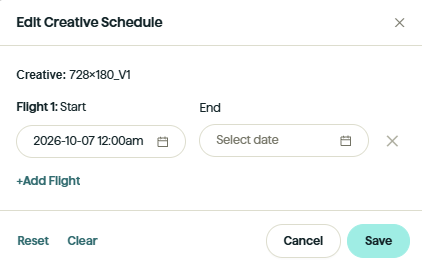
Click Save to save the schedules. The configured schedules will be displayed in the Schedule column on the Creative.
Ad Set Scheduling Creatives (Legacy)
Existing Manual Ad Sets with ad set-level schedules can still use those schedules. New schedules should be created at the Creative level.
Note: Adding a schedule on the Ad Set level to a creative with an existing creative-level schedule will override it for that Ad Set only.